Raise prices across your customer base in minutes
Costs are up. It's time to raise your prices. But with hundreds of customers and thousands of scheduled visits, updating everything manually would take days. LawnPro's bulk price update lets you apply percentage or flat-rate increases to a single service—or your entire catalog in one pass—with a full preview of who's affected before you commit.
The annual price increase headache
Every year, costs go up. Fuel, fertilizer, equipment, insurance, wages—everything gets more expensive. To stay profitable, you need to raise your prices. But the thought of updating hundreds of customers manually is enough to make you postpone it indefinitely.
Some companies try to handle it one customer at a time: open the property, find the service, update the price, save, repeat. For 200 customers, that's 200 tedious edits. Miss one, and that customer stays at the old price all season. Forget to update their scheduled visits, and you're billing at the old rate even after you "raised" prices.
Other companies give up on precision and just raise prices for new customers, leaving existing customers at legacy rates that erode margins over time. That's not sustainable.
LawnPro's bulk price update fixes all of this. Select a service, choose your increase (percentage or flat dollar amount), and see exactly which properties and visits will be affected. Review the list, uncheck anyone you want to exclude, and apply. What used to take hours now takes minutes—and you have complete visibility and control.
And when it's time for your annual across-the-board increase, you don't have to go service by service. The catalog-wide Bulk Price Update page lists every item and service you offer, shows you how many properties, visits, recurring series, and quick dispatch templates each one reaches, and applies your percentage or dollar change to everything you select—in a single pass.
How bulk price updates work
Three steps from old prices to new prices—with full control at every stage.
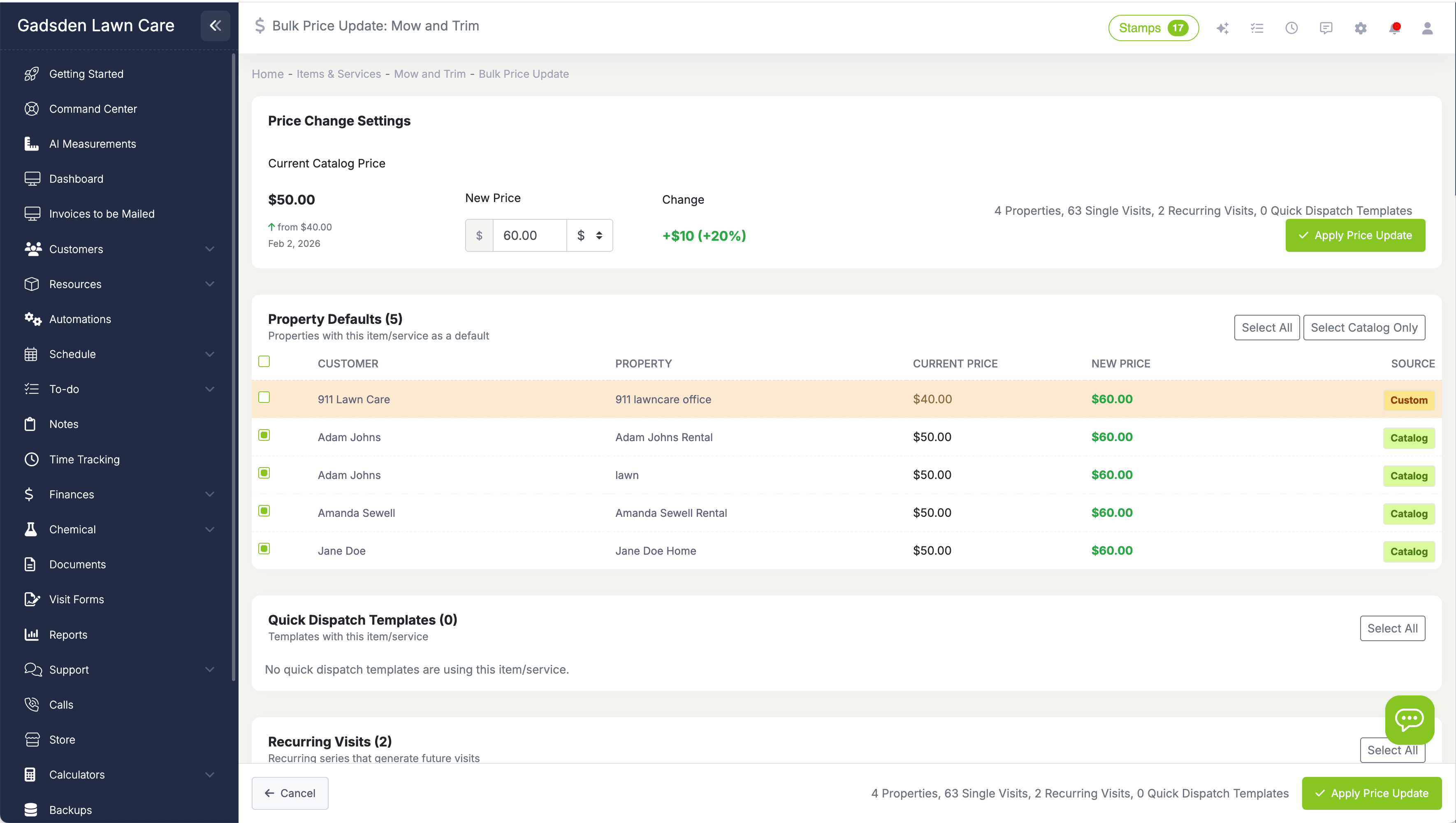
Define the change
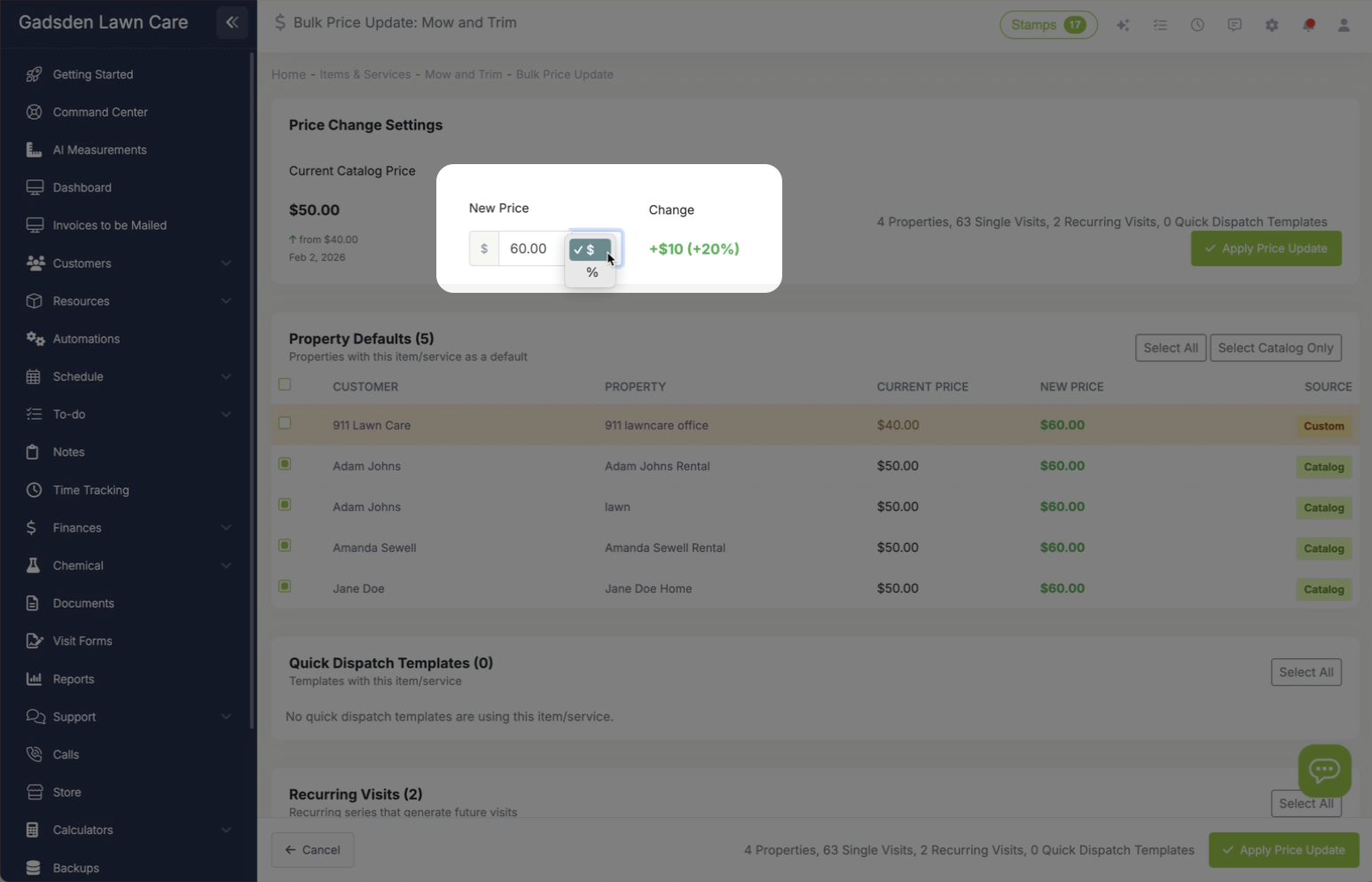
Select a single service—or your entire catalog at once—and choose your increase: a percentage (like 5%) or a flat amount (like $5). Set whether to apply to property prices, scheduled visits, recurring visits, and quick dispatch templates.
Preview who's affected
LawnPro shows you every property, scheduled visit, recurring series, and quick dispatch template that will change. Review the list, see old vs. new prices, and uncheck anyone you want to exclude.
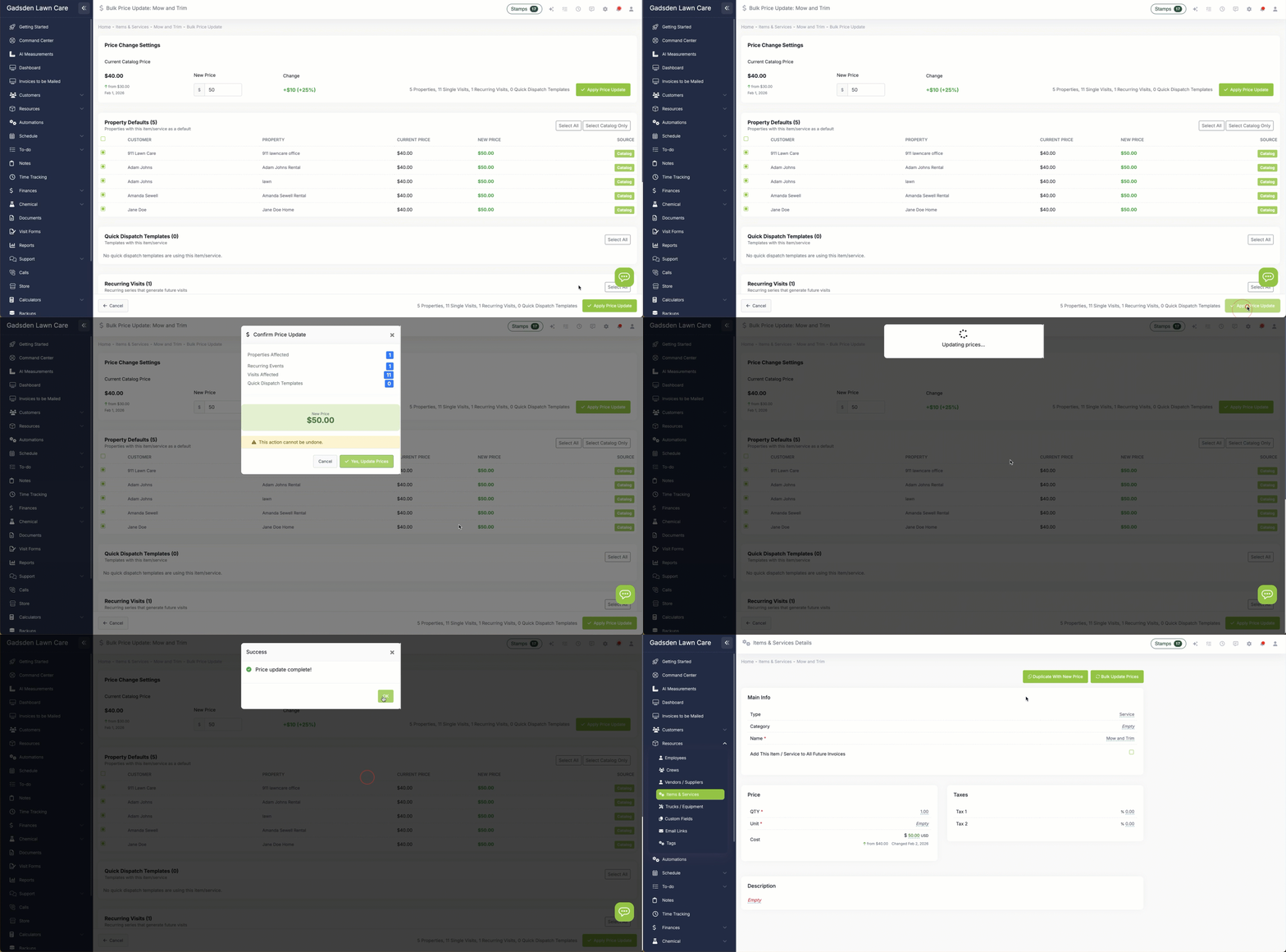
Apply the update
Confirm the totals and LawnPro updates everything—the catalog price, all selected property prices, scheduled visits, recurring visits, and quick dispatch templates. You get a summary of exactly what changed.
Understanding your three-tier pricing
To use bulk price updates effectively, it helps to understand how pricing works in LawnPro. There are three levels:
Catalog Price: This is your master price for a service—your default rate. When you add a service to a new property, it starts at the catalog price.
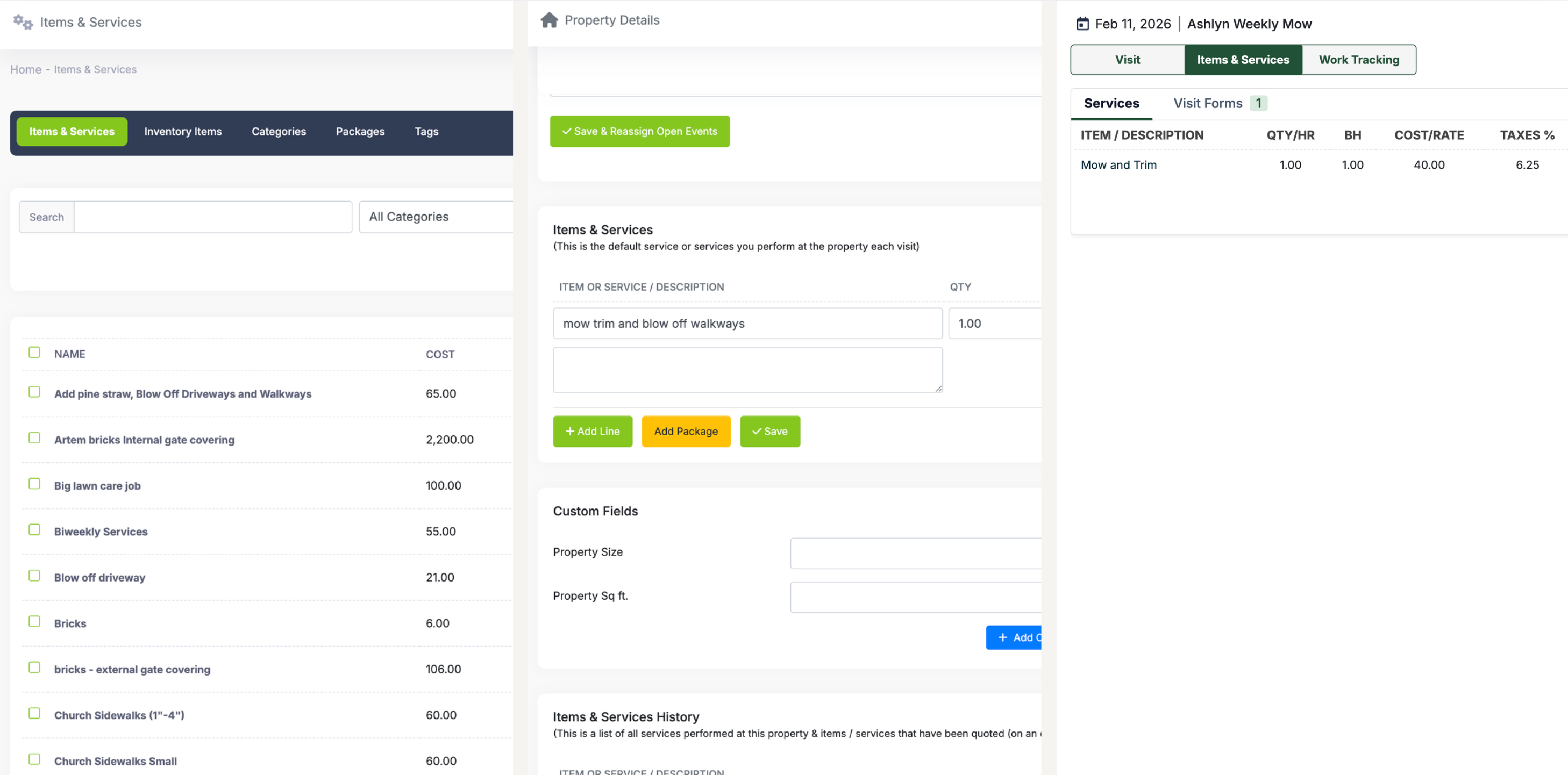
Property Price: This is the price for a specific service at a specific property. It can match the catalog price, or it can be customized. Maybe Mrs. Smith has a larger yard and pays $55 instead of the standard $45.
Visit Price: This is the price on an already-scheduled visit. Once a visit is scheduled, it has its own price that doesn't automatically change if you update the property or catalog prices later.
Prices also live on recurring visit series (which generate your future visits) and quick dispatch templates—and the bulk price update reaches those too. When you apply an update, you choose exactly which levels to touch. Typically, you'll update all of them to keep pricing consistent across the board.
Update your entire catalog in one pass
Annual increase time? You don't have to reprice your services one at a time. The catalog-wide Bulk Price Update page—one click from your Items & Services list—shows every active item and service you offer in a single table.
Next to each item you'll see exactly what a price change will reach: how many properties use it as a default, how many open future visits have it on the work order, how many recurring series generate visits with it, and how many quick dispatch templates include it.
Select the items you want (Select All covers your whole catalog), enter a percentage or dollar change—positive to increase, negative to decrease—and watch the New Price column preview every result live. Pick which levels to update: property prices, scheduled visits, recurring visits, and quick dispatch templates.
Before anything changes, a confirmation shows the total counts of everything about to be updated. After you apply, a summary tells you exactly how many catalog prices, property prices, visits, recurring series, and templates were changed. A 30-service seasonal increase that used to be 30 separate passes is now one.
Percentage or flat-rate increases
You have two options for how to calculate your price increase:
Percentage Increase: Raise all prices by a percentage, like 5% or 10%. A $40 service becomes $42 at 5%. A $60 service becomes $63. This keeps your pricing proportional—bigger jobs get bigger increases.
Flat-Rate Increase: Add a fixed dollar amount to all prices, like $5 or $10. A $40 service becomes $45. A $60 service becomes $65. Everyone gets the same dollar increase regardless of the original price.
You can also do a decrease if needed—maybe you're running a promotion or adjusting for market conditions. Just enter a negative percentage or amount.
Most lawn care companies do an annual percentage increase of 3-5% to keep up with inflation. Some do a flat $5 increase for simplicity. Choose whatever makes sense for your business.
Preview everything before you commit
Before any prices actually change, LawnPro shows you a complete preview of what will be updated. This is crucial—you don't want any surprises.
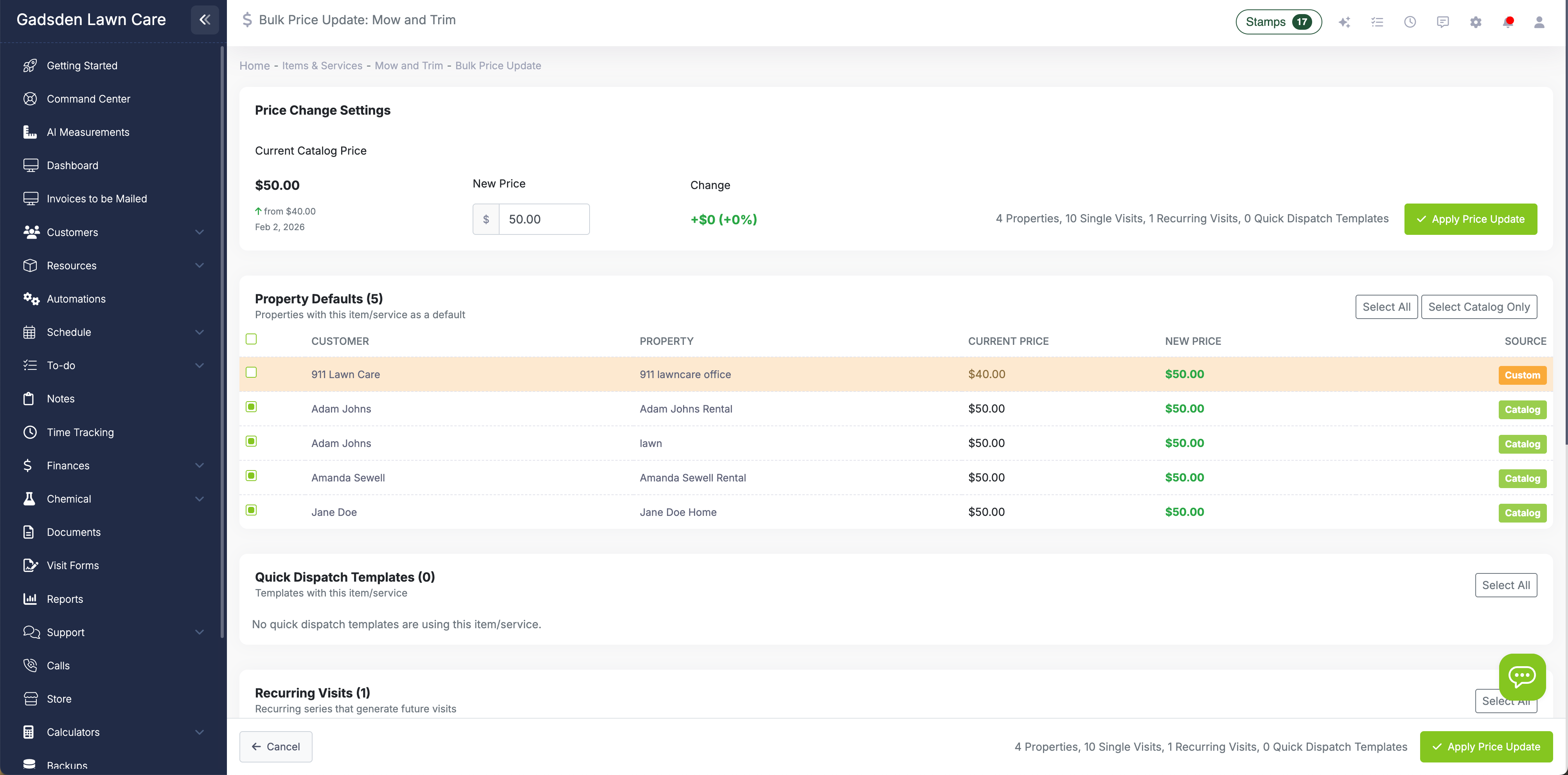
The preview screen shows everything the change will reach: property defaults, upcoming single visits, recurring visit series, and quick dispatch templates. For each row, you see the customer name, current price, and new price after the increase.
Each row has a checkbox. Catalog-priced rows are selected by default; custom-priced properties and manually edited visits are flagged with a badge and left unchecked so you don't accidentally overwrite an intentional price. If there's anyone you want to exclude—maybe they're on a special contract rate, or you promised them no increase this year—just uncheck them. They stay at the old price while everyone else updates.
This preview-and-select approach gives you the efficiency of bulk updates with the control of individual edits. You're not blindly applying changes; you're reviewing and approving each affected customer.
Track price changes over time
LawnPro keeps a history of price changes so you always know when prices were last updated and what they were before.
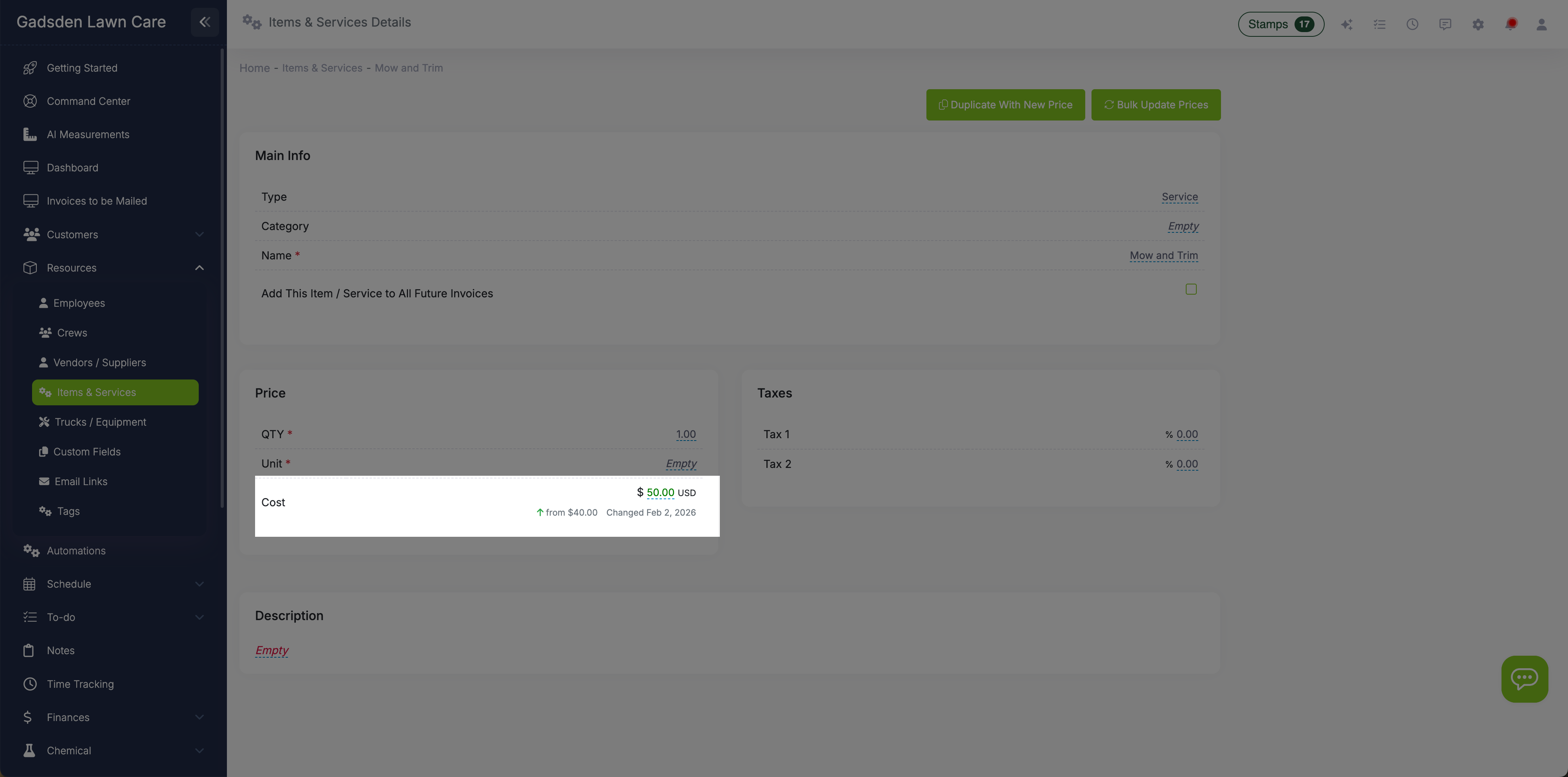
On each service item, you can see the previous price and the date it was changed. On property service records, you can see whether the current price came from the catalog or was set manually. This helps you understand your pricing landscape before making changes.
After a bulk update, all affected records show the new "price last changed" date. This makes it easy to identify which customers have been updated and which might have been skipped. If a customer calls asking about their price increase, you can see exactly when it happened and what the old price was.
This audit trail is invaluable for managing customer relationships. You can say with confidence: "Yes, your price went from $45 to $47.25 on January 15th, a 5% increase in line with our annual adjustment."
Handle custom prices intelligently
What happens when a property has a custom price that differs from the catalog? LawnPro protects it.
LawnPro tracks where every price came from and marks each property as "Catalog" or "Custom." Custom prices are shown in the preview but are not selected by default—maybe Mrs. Smith negotiated her $55 rate, and a bulk update shouldn't quietly change it. The same protection applies to visits whose price was manually edited after scheduling: they're flagged "Manually Edited" and skipped unless you say otherwise.
If you do want a custom-priced property brought up to the new catalog price, just check its box in the preview and it updates with everyone else. Either way, the decision is yours—made per customer, with the badge right next to the checkbox.
And some things are always off-limits: completed visits and visits that have already been invoiced are never modified by a bulk price update. Your billing history stays exactly as it was.
See it in action
Change one service everywhere it is used, then raise several prices at once, in under three minutes.
Common price update scenarios
Annual Increase
Every January, raise your entire catalog by 5% in one pass to keep up with inflation and rising costs. Applies to catalog prices, properties, future visits, and recurring series.
Fuel Surcharge
Gas prices spike mid-season. Add a flat $3 fuel surcharge to all services temporarily. Remove it later when prices stabilize.
Product Cost Increase
Your fertilizer supplier raised prices 8%. Pass that along by increasing all fertilization services by the same percentage.
Minimum Wage Increase
Labor costs went up. Raise all service prices by a flat $5 per visit to cover the increased wages.
New Customer Pricing
Update just the catalog price for new customers without affecting existing customers. They stay at their current rates.
Price Correction
Realized you priced a service too low? Update it across all properties and visits to match what it should have been.
Why lawn care pros love bulk price updates
Save hours of manual work
What used to take a day of tedious clicking now takes 10 minutes. Update hundreds of customers in a single batch.
Never miss a customer
The bulk update catches everyone with that service—properties, scheduled visits, recurring series, and quick dispatch templates. Even ordinary price edits are covered: change a catalog price anywhere and LawnPro offers to review and update it everywhere.
Full visibility before you commit
See exactly who will be affected and what their new prices will be. No surprises, no regrets.
Granular control
Exclude specific customers with a checkbox. Handle VIPs, contracts, and special cases without leaving the bulk workflow.
Complete audit trail
Know exactly when prices changed and what they were before. Answer customer questions with confidence.
Protect your margins
Easier price updates mean you actually do them. No more postponing increases until your margins erode.
Learn More
Explore related features
Invoicing
Your updated prices flow through to invoices automatically. No manual invoice editing needed.
Scheduling
Scheduled visits get the new prices. All future work reflects your updated rates.
Reporting
Track revenue before and after price increases. See the impact on your bottom line.