Build once. Run for hundreds of customers.
Manage multi-visit fertilization and chemical treatment programs from a single place. Assign chemicals per step, track program status, pause or cancel anytime, and send post-application PDF reports in one click—while condition codes your crew notes turn into recommended treatments on the invoice.
How multi-step programs work
Three steps to go from template to a fully scheduled chemical program.
Create a template
Define your program: name it, add each step with its services and chemical assignments, and set the number of days between steps. Save as a reusable template.
Assign properties
Select the template and check off the properties you want to enroll—one or hundreds at once. LawnPro generates all visits automatically.
Track and report
Monitor status, pause or cancel as needed, and send customers a post-application PDF report after each completed step in one click.
Everything in one chemical program system

Create reusable program templates
A program template is your master blueprint. It defines the program name, how many steps it has, what services and chemicals are used at each step, and how many days pass between steps. Build it once and reuse it for any number of customers without rebuilding from scratch.
Most lawn care companies maintain 3–8 templates covering their core programs: basic fertilization, premium fertilization with weed control, pest control, mosquito treatments, tree and shrub care. Templates can be edited at any time—changes apply to new enrollments only, so existing customers in progress aren't affected.

Assign the right chemical to every step
Each step in a program has its own chemical assignment. Step 1 might call for a pre-emergent herbicide at a specific rate. Step 2 might use a broadleaf weed control. Step 4, a grub control product. Each step stores the product name, application rate, unit of measure, and target pest—independently.
Each step's chemicals are pre-loaded on the visit it creates, so the crew knows exactly what to pull off the truck and how much to apply. When the visit is completed, LawnPro saves a chemical application record with the product, rate, and weather. No separate data entry, no relying on memory.
Chemical assignments per step also feed directly into the post-application PDF reports, giving customers and regulators accurate product documentation for every visit.

Pause, resume, or cancel at any time
Each program enrollment shows its current status: Active, Paused, Completed, or Cancelled, and you can filter the program list by status. You have full control at any point in the program's lifecycle.
Pause a program when a customer temporarily stops service—for travel, budget reasons, or a property that's between seasons. Its upcoming visits go on hold, and all completed steps and chemical records are preserved. When you resume, those visits come off hold and the program picks up where it left off.
Cancel a program to end it, with an optional reason, and its open visits are cancelled too. Completed steps and reports remain accessible so you still have the full application history. LawnPro records when a program was paused, resumed, completed, or cancelled.
Professional documentation after every application
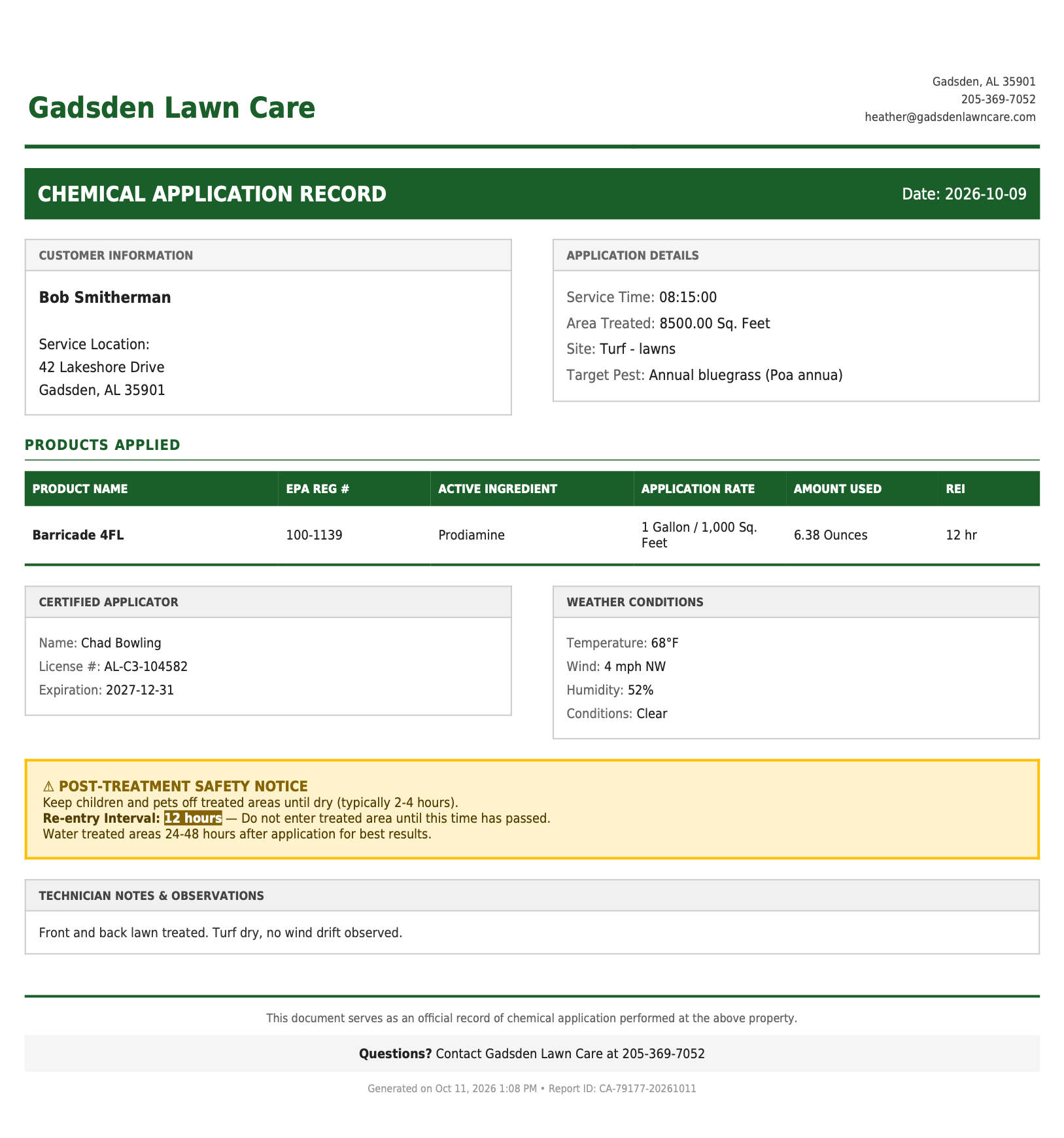
When a chemical application step is completed, LawnPro builds a post-application PDF report from the visit's records, ready to send in one click. The report documents the property address, application date, chemicals applied, rates, target pests, technician, and the weather at the time of application.
Send it to the customer so they know exactly what was applied and when—or keep it on file for regulatory compliance and inspection records. For businesses in states that require chemical application documentation, this report satisfies that requirement without any extra data entry.
Post-application reports are generated per step, so customers on a 6-step program can receive a professional report after each of the 6 visits. Over the course of a season, you build a complete, documented service record without extra data entry. A Visit Completed automation can also email or text customers the products applied, re-entry interval, and weather automatically.
Turn what your crew sees into recommended treatments
When a technician completes a chemical visit, the Conditions Observed section lets them note problems on the property, grouped as insects, fungal disease, weeds, turf, and other. Each condition carries a price and optional notes, such as "grubs in the back yard" or "brown patch along the driveway."
When the visit is invoiced, every observed condition becomes a Recommended Treatment line on the invoice, using the price your technician entered. The problem your crew spotted turns into added revenue without a separate follow-up call.
You can add a set of pre-built condition codes from Items & Services in one click, then edit, price, or remove them to match the treatments you sell.
Every step, visit, and invoice in one place
Open any enrolled program to see all of its steps: the service date, services, chemicals, and assigned employees for each one, with links straight to the step's visit and invoice.
When a customer calls asking about their lawn, pull up their program and see what was scheduled and applied at each step. The program list filters by Active, Paused, Completed, and Cancelled, and your routes can be filtered by step—so you can see every property due for Round 3.
At the end of the season, every completed step has its chemical application record and PDF report—useful for renewals, upsell conversations, and the records many states require.
See it in action
Build a four-round fertilization program, then start it for a customer and schedule every visit.
Perfect for these services
Any service with multiple applications at different intervals—multi-step programs handle it.
Fertilization Programs
4, 5, 6, or 8-step programs with pre-emergent, fertilizer, weed control, grub control, and winterizer—each step with its own chemical assignment.
Pest Control
Quarterly or bi-monthly treatments with different products by season. Post-application PDFs document each visit for regulatory compliance.
Mosquito Control
Monthly treatments from April through October with barrier sprays and larvicide—5 to 7 steps per property with per-step chemical records.
Tree & Shrub Care
Dormant oil, insecticide applications, disease prevention, and deep root fertilization—different treatments at different times, each with its own application record.
Irrigation Maintenance
Spring startup, mid-season check, and winterization—three steps at different times with different services and pricing for each.
Weed Management
Pre-emergent and post-emergent applications timed to the season. Condition codes capture what was observed so recommended treatments land on the invoice.
We run a 6-step fertilization program for 300+ customers. Before LawnPro, I was manually creating every visit. Now I build the template once, assign it to all 300 properties, and every visit for the whole season generates automatically—with the right chemical pre-loaded for each step. It cut my setup time from a full day to about 20 minutes.
LawnPro Customer
Why lawn care pros use multi-step programs
From scheduling to chemical documentation to customer communication—one system handles the full program lifecycle.
Chemicals Assigned per Step
Each step stores its own product, rate, and target pest. Crews see exactly what to apply on every visit—no guessing, no mistakes.
Pause, Resume, Cancel
Full lifecycle control. Pause when a customer stops temporarily, cancel permanently, or resume right where you left off—all history preserved.
Post-Application PDF Reports
Professional documentation built from each completed step, ready to send in one click. Send to the customer or store for compliance—no extra data entry.
Recommended Treatments
Condition codes noted during the visit become Recommended Treatment lines on the invoice, so the problems your crew spots turn into added revenue.
Save Hours of Scheduling
Build the template once, assign to hundreds of properties, and let LawnPro generate all the visits. What used to take hours takes minutes.
Never Miss a Step
Every application is scheduled with the correct timing. No more manually calculating when Round 3 is due or hoping nothing falls through the cracks.
Crews Know What to Do
Each visit shows the specific service and chemical for that step, already filled in before the crew arrives.
Complete Application History
Every chemical, every step, every property—fully recorded. Essential for renewals, customer questions, and regulatory compliance.
Sell Programs, Not Visits
A "6-Step Premium Lawn Care Program" is easier to sell than individual visits. Package your services professionally and retain customers season after season.
What are multi-step chemical programs in LawnPro?
Multi-step chemical programs in LawnPro let you manage multi-visit fertilization and treatment plans from a single place. You define a program template—each step, the chemical assigned to that step, the interval between steps, and the services performed—then assign it to any number of properties at once. LawnPro generates all the scheduled visits automatically, with the correct services, chemicals, and timing for each step already filled in.
What separates LawnPro's chemical programs from basic scheduling is the per-step chemical assignment. Each step in the program stores its own product, application rate, unit of measure, and target pest. The specific product and rate are pre-loaded on each step's visit before the crew arrives, and completing the visit saves the chemical application record—no guessing, no relying on memory, no separate log to maintain.
Program status tracking gives you full lifecycle control. Each enrollment shows whether it's Active, Paused, Completed, or Cancelled. Pausing puts upcoming visits on hold while preserving all completed steps and chemical records—so when the customer returns, you resume where you left off. Cancelling ends the program and its open visits while keeping the full application history intact.
After each completed application step, LawnPro builds a post-application PDF report from the visit's records, ready to send in one click. The report documents the property, date, chemicals applied, rates, target pests, technician, and the temperature, wind, and humidity at the time of application. Condition codes the technician notes at close of visit become Recommended Treatment lines on the invoice. Customers get professional documentation for every application without any extra data entry on your end, and you keep the application records many states require. See chemical application tracking for what's recorded.
Frequently asked questions
Yes. Each step in a program has its own chemical assignment—product name, application rate, unit, and target pest. Step 1 might be pre-emergent herbicide, Step 3 broadleaf weed control, Step 4 grub control. The correct chemical is pre-loaded on each visit so there's no guessing.
Each enrollment shows its current status: Active, Paused, Completed, or Cancelled. You can change status at any time, and LawnPro records when each program was paused, resumed, completed, or cancelled.
Pausing puts the program's upcoming visits on hold but preserves all completed steps and chemical records. When you resume, those visits come off hold and the program picks up where it left off. The full history remains intact for reporting and compliance.
The report includes the property address, application date, chemicals applied, rates, units, target pests, technician name, and the temperature, wind, and humidity at the time of application. It's built from the completed step's records, so there's no extra data entry—send it in one click.
Condition codes are problems a technician can note while completing a chemical visit: insects, fungal disease, weeds, turf damage, and more. Each one carries a price and optional notes, and when the visit is invoiced it becomes a Recommended Treatment line on the invoice, so observed issues get addressed without a follow-up call.
There's no limit. Select one property or hundreds—LawnPro generates all visits for all properties in a single operation. Assigning a 6-step fertilization program to 300 customers takes the same amount of time as assigning it to 3.
Multi-step chemical programs are available on the Grow and Plus plans.
Explore related features
Multi-step programs work hand-in-hand with these other LawnPro tools.
Chemical Application Tracking
EPA numbers, rates, applicator license, and weather filled in automatically on every application record.
Level Billing
Combine seasonal treatment programs with flat-rate monthly billing. Customers pay the same amount each month for their full program.
Scheduling
All program visits appear on the calendar with the rest of your schedule. Drag, drop, and manage everything in one place.
Resources
Help Articles
Step-by-step guides for creating templates, assigning properties, and managing program status.
Read Articles →Video Tutorials
Watch how to build a program template and assign it to hundreds of customers at once.
Watch Videos →Talk to Support
Questions about chemical programs? We're here 7am-7pm CST, 7 days a week.
Contact Us →